

A normal average treats every number equally. A weighted average lets some numbers count more – an exam more than a quiz, a big order more than a small one. It is the right tool whenever the things you are averaging are not the same size. Try it with your own numbers in our Average Calculator.
The weighted average formula
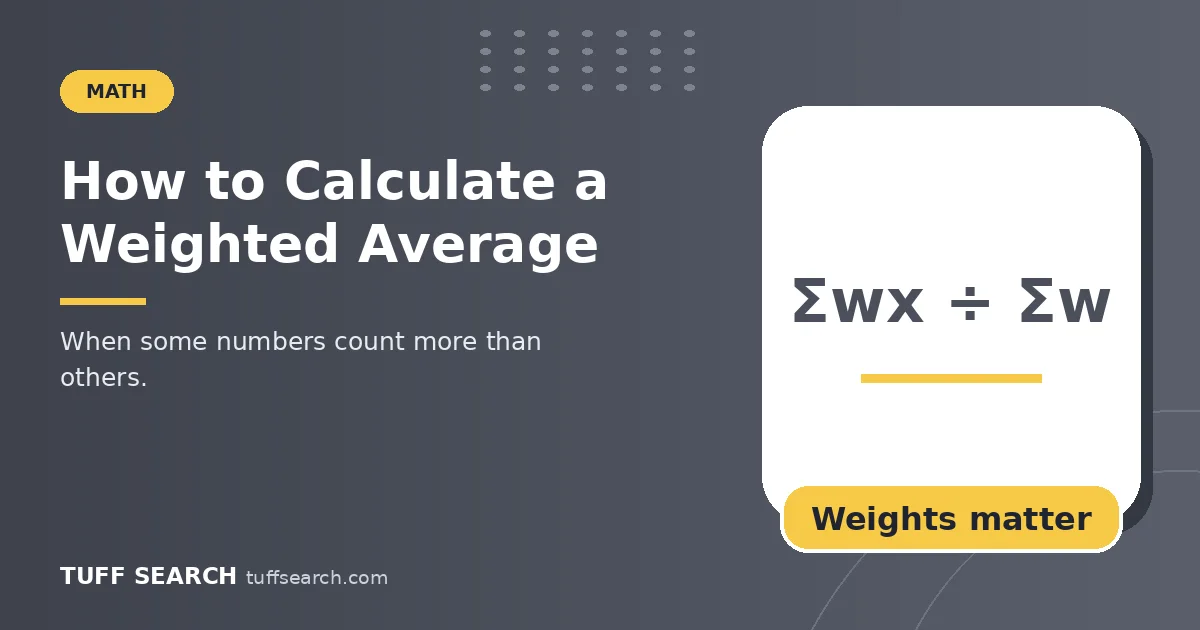
Weighted average = Σ(weight × value) ÷ Σ(weights). Multiply each value by its weight, add the products, and divide by the total of the weights.
Example
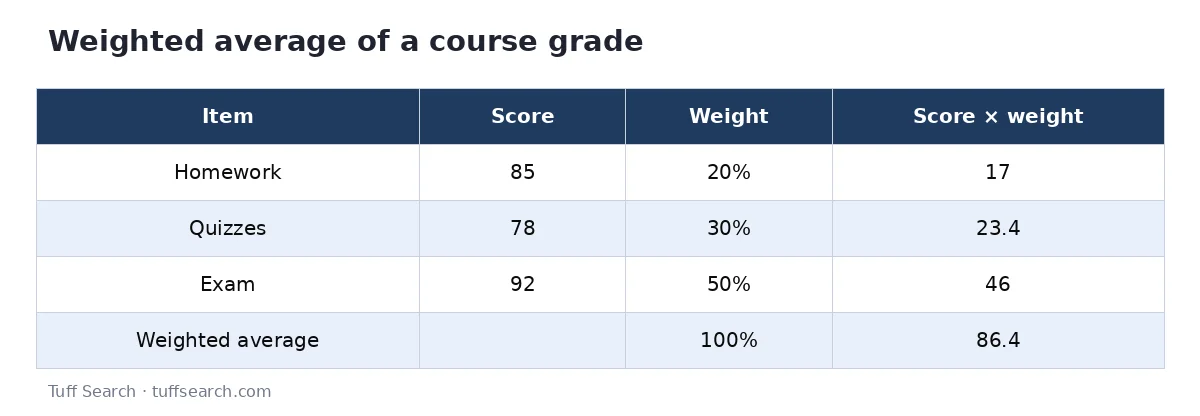
homework 85 (weight 20%), quizzes 78 (30%), exam 92 (50%). 85 × 0.2 + 78 × 0.3 + 92 × 0.5 = 17 + 23.4 + 46 = 86.4. The simple average of the three scores is 85, so the weighting adds 1.4 points because the best score carries the most weight.
Weights that are not percentages
Weights can be credits, quantities or hours. Grades of 90 (3 credits), 80 (4 credits) and 70 (1 credit): (270 + 320 + 70) ÷ 8 = 82.5. You divide by 8, the total credits, not by 3.
| Use | Values | Weights |
|---|---|---|
| Course grade | Category scores | Syllabus percentages |
| GPA | Grade points | Credit hours |
| Average price paid | Price per unit | Units bought |
| Portfolio return | Each asset’s return | Share of the portfolio |
| Survey score | Group averages | Group sizes |
Average price example
You buy 10 units at $2.50 and 30 units at $3.10. Weighted average price = (10 × 2.50 + 30 × 3.10) ÷ 40 = $2.95. The simple average of the two prices, $2.80, would understate what you really paid.
The ‘average of averages’ trap
Class A (10 students) averages 90 and Class B (30 students) averages 70. The overall average is not 80. It is (10 × 90 + 30 × 70) ÷ 40 = 75, because there are three times as many students in Class B. Whenever groups differ in size, weight by the group size.
When to use a simple average instead
If every value represents the same amount – five tests worth the same, daily temperatures, equal-sized samples – weights are all equal and the weighted average equals the simple average. Adding weights only matters when importance or size differs.
Doing it in a spreadsheet
With values in A2:A4 and weights in B2:B4, use =SUMPRODUCT(A2:A4, B2:B4) / SUM(B2:B4). This works whether or not the weights add up to 100%.
A step-by-step check you can reuse
- List every value with its weight in two columns.
- Make sure the weights describe the same thing (all percentages, or all quantities).
- Multiply across each row.
- Add the products, add the weights, divide.
- Sanity check: the result must sit between the smallest and largest value, nearer the values with big weights.
Portfolio example
An investor holds 60% in a fund that returned 8%, 30% in a fund that returned 3% and 10% in cash that returned 1%. Weighted return = 0.6 × 8 + 0.3 × 3 + 0.1 × 1 = 4.8 + 0.9 + 0.1 = 5.8%. The simple average of the three returns, 4%, would be misleading because most of the money was in the best performer.
Weighted average vs weighted sum
If the weights already add to 1 (or 100%), the weighted sum is the weighted average and no division is needed. If they do not – credits, units, hours – you must divide by their total. Forgetting this step is the single most common error, and it usually produces an answer that is obviously too large.
Frequently asked questions
An average in which each value is multiplied by a weight that reflects its importance.
No. Divide by the sum of the weights, whatever it is.
A normal average gives every value the same weight.
Multiply each category score by its syllabus weight and add the results.
No. It always lies between the smallest and largest value.