
Your TDEE is your BMR multiplied by an activity factor. Of all the inputs in a calorie calculator, the activity level is the one people most often get wrong, and it can change the result by more than 1,000 calories a day.
The standard activity multipliers
| Level | Multiplier | Typical description |
|---|---|---|
| Sedentary | 1.2 | Desk job, little or no planned exercise |
| Lightly active | 1.375 | Light exercise 1–3 days a week |
| Moderately active | 1.55 | Moderate exercise 3–5 days a week |
| Very active | 1.725 | Hard exercise 6–7 days a week |
| Extra active | 1.9 | Very hard training or a physically demanding job plus exercise |
How much difference it makes
For a 30-year-old man weighing 80 kg and 180 cm tall, Mifflin-St Jeor gives a BMR of 1,780 kcal. Multiplying by each factor:
| Level | TDEE (kcal/day) |
|---|---|
| Sedentary (1.2) | 2,136 |
| Lightly active (1.375) | 2,448 |
| Moderately active (1.55) | 2,759 |
| Very active (1.725) | 3,071 |
| Extra active (1.9) | 3,382 |
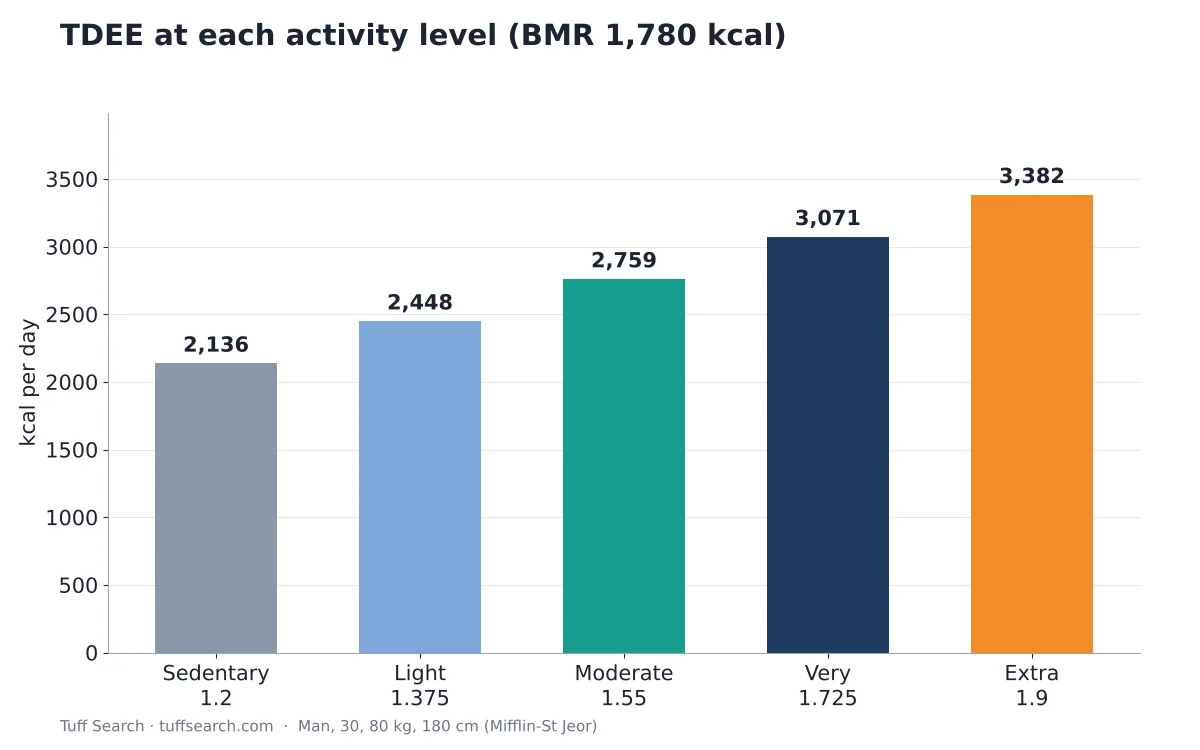
Choosing “very active” instead of “lightly active” adds over 600 kcal a day for this person. If that choice is wrong, a planned deficit can disappear completely.
Try it with your numbersTDEE CalculatorEstimate your total daily energy expenditure with the Mifflin-St Jeor equation and activity levels, then set calorie…Open calculatorHow to choose your level
- Count all your movement, not just workouts. A job on your feet all day counts.
- Be conservative. Most people with a desk job and three gym sessions a week are lightly to moderately active, not very active.
- Do not count the same exercise twice: if you choose an activity level, do not also add back calories from a fitness tracker.
- If you are between two levels, start with the lower one.
Test and adjust
No multiplier fits everyone. Eat at your estimated TDEE for two to three weeks while tracking your weight at the same time of day. If your weight stays steady, the estimate fits. If it drifts, adjust intake by about 100 to 200 kcal and reassess.
Where the numbers come from
These factors are widely used conventions for estimating energy expenditure from BMR. They are approximations built for groups of people, which is why personal testing beats any table.
If you’re unsure whether your walks count as exercise, our guide to brisk walking pace explains how fast moderate-intensity walking is. To turn your TDEE into a weight-loss target, see calorie deficit explained.
Try different levels
The TDEE calculator lets you switch activity levels and see the change immediately. For background, read TDEE vs BMR.
Important
Important: This article is general educational information, not medical or nutrition advice. Talk to a doctor or registered dietitian before changing your diet, especially if you are pregnant, under 18, or have a medical condition.
Frequently asked questions
Usually lightly active (1.375) to moderately active (1.55), depending on how intense the sessions are and how much you move the rest of the day.
Yes, if you do little planned exercise. Add your exercise days to move up a level.
Trackers estimate calories differently and can be inaccurate. Use one method consistently and judge by your weight trend.
Yes. A new job, sport or training plan can change your activity level.
Related calculators
Related articles
- What Is Brisk Walking? Pace, Steps and Benefits
- Calorie Deficit Explained: How to Set a Safe Target
- TDEE vs BMR: What’s the Difference and Which to Use?