
Most small businesses set a marketing budget by looking at what is left over. A better approach starts from what you want to achieve and what you can afford to pay for each customer. This guide covers four practical methods, with worked examples you can adapt, and the minimum budgets the main ad platforms require.
Before you start: know three numbers
- Gross margin – the share of each sale left after the cost of the product or service. See markup vs margin.
- Average order or deal value – what a typical customer spends.
- Conversion rates – the share of visitors who become leads, and of leads who become customers. Use your analytics; if you have none yet, plan a small test first.
Method 1: Percentage of revenue
The simplest approach is to spend a fixed share of revenue, such as a single-digit percentage for an established business or more for a business trying to grow quickly. It is easy to plan and keeps spending in line with income. The weakness is that it ties marketing to past sales: a new business with little revenue gets a tiny budget just when it most needs customers. Treat any percentage as a starting point to test, not a rule.
Try it with your numbersFacebook Ads Cost CalculatorPlan a Facebook and Instagram ads budget from your own CPM, CTR and conversion rate, and estimate reach, clicks, leads…Open calculatorMethod 2: Goal-based (work back from the target)
Start with how many customers you need and work back through your funnel:
- Goal: 50 new customers a month.
- If 20% of leads become customers, you need 50 ÷ 0.20 = 250 leads.
- If 4% of website visitors become leads, you need 250 ÷ 0.04 = 6,250 visits.
- At an average cost of $1.25 per click, that is 6,250 × $1.25 = $7,812.50 a month of ads.
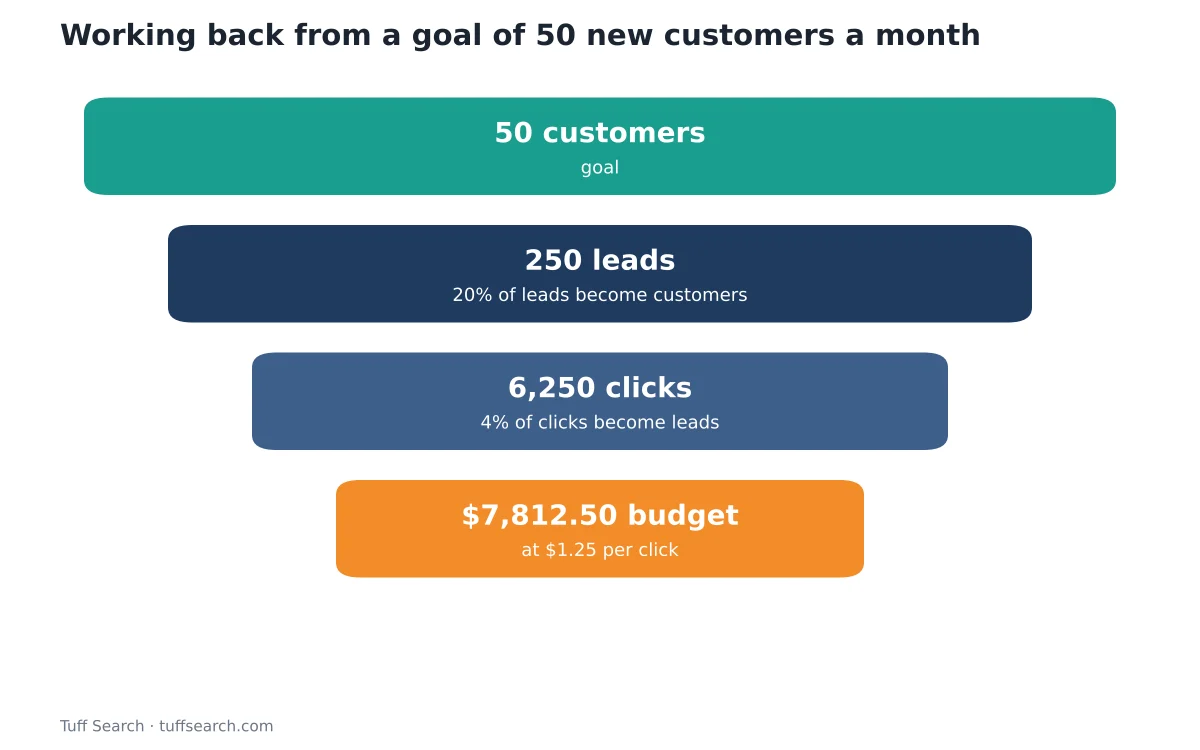
If the result is more than you can afford, the same chain shows where to improve: doubling the lead rate from 4% to 8% would halve the budget. The Facebook ads cost calculator and LinkedIn ads budget calculator both run this calculation in reverse.
Method 3: CAC-based (what can you afford per customer?)
Decide the most you can pay to win a customer, then multiply by the customers you want. With a $90 average order and a 40% gross margin, the first order brings $36 of gross profit. If customers typically order three times, lifetime gross profit is about $108. A business that wants to recover its acquisition cost on the first order would cap CAC at $36; one confident in repeat purchases might allow more, accepting a longer payback. Read customer acquisition cost explained for the full method.
Budget = Target new customers × Allowable cost per customer
Example
100 new customers × $30 allowable CAC = $3,000 a month.
Method 4: Test budget for a new channel
When you have no data, budget for learning. Run a fixed test long enough to collect a meaningful number of conversions, then decide whether to scale. Each platform has its own minimums:
| Platform | Minimum budget (as published by the platform) | Plan with |
|---|---|---|
| LinkedIn Ads | $10 a day per campaign | LinkedIn ads budget calculator |
| TikTok Ads | Campaign budget over $50; ad group daily budget over $20 | TikTok ads budget calculator |
| Meta (Facebook and Instagram) | Low daily minimums, but ad sets learn best with about 50 optimisation events a week | Facebook ads cost calculator |
| YouTube (Google Ads) | No large fixed minimum; you set a daily budget | YouTube ads budget calculator |
Platform minimums change; check each platform’s help pages before launching.
Splitting the budget
A practical split for a small business is to put most of the budget into channels that already work, a smaller share into improving them, and a small share into experiments. Some marketers describe this as a 70/20/10 split – a useful habit rather than a law. Review results monthly and move money toward the lowest cost per customer.
Don’t forget organic channels
SEO, email and referrals take time but can lower your average cost per customer. Budget for them as investments: content, tools and someone’s time. Estimate the payback with the SEO cost calculator and compare with paid channels using ROAS.
A monthly review checklist
- Spend by channel vs plan.
- New customers by channel and cost per customer.
- Return on ad spend against your break-even ROAS (1 ÷ gross margin).
- Changes in conversion rates on your website.
- Decide: scale, fix or stop each channel.
Frequently asked questions
There is no single right figure. Work back from your customer goal and the cost per customer you can afford, then check the result against what your cash flow allows.
Goal-based budgeting: start with the customers you need, work back through your conversion rates and cost per click to find the spend.
LinkedIn’s minimum is $10 a day per campaign, according to LinkedIn’s own guidance.
Long enough to collect a meaningful number of conversions – often at least a few weeks for small budgets – before deciding to scale or stop.
Related calculators
- Facebook Ads Cost Calculator
- LinkedIn Ads Budget Calculator
- TikTok Ads Budget Calculator
- YouTube Ads Budget Calculator
- SEO Cost Calculator
- ROAS Calculator